You can now open an AI coding tool, describe a small application in ordinary language, and have something recognizable running before your coffee gets cold.
That is impressive. It is also a little dangerous, in the same way a rented sports car is impressive when you have only driven a hatchback around town.
The excitement around vibe coding comes from this feeling of momentum. You describe what you want, the assistant writes code, you run it, paste the error back into the chat, and keep going. The distance between an idea and a working demo is shorter.
Software engineering has not become unnecessary. Getting something on screen is cheaper now. Knowing whether it is correct, secure, maintainable, and worth keeping is still a human job.
What Does Vibe Coding Mean?
Vibe coding is a loose term for building software primarily through natural-language conversations with an AI assistant. Instead of writing every function yourself, you describe an outcome, accept generated code, run it, and guide the next change with feedback.
The phrase can describe a spectrum of behavior.
At one end, a developer uses AI like an unusually fast autocomplete tool. They ask for suggestions, inspect the result, and make the final decisions line by line. At the other end, someone describes an application, accepts large generated changes with minimal review, and judges progress mostly by whether the screen looks right.
The second version is what people usually mean by vibe coding. The developer is following the direction of the project and reacting to its output more than directly authoring its implementation.
That distinction matters. Asking an assistant to explain a confusing function is different from asking it to create an authentication system and deciding it is finished because the login button changed color.
A simple example might look like this:
Build a small web app that tracks household expenses.
Use local storage, allow filtering by category, and show a monthly total.
Keep the UI simple and make the data model easy to replace later.
The assistant can turn that description into a project, components, styles, and event handlers. The developer then runs it, notices that deleting an expense does not update the total, and asks for a fix.
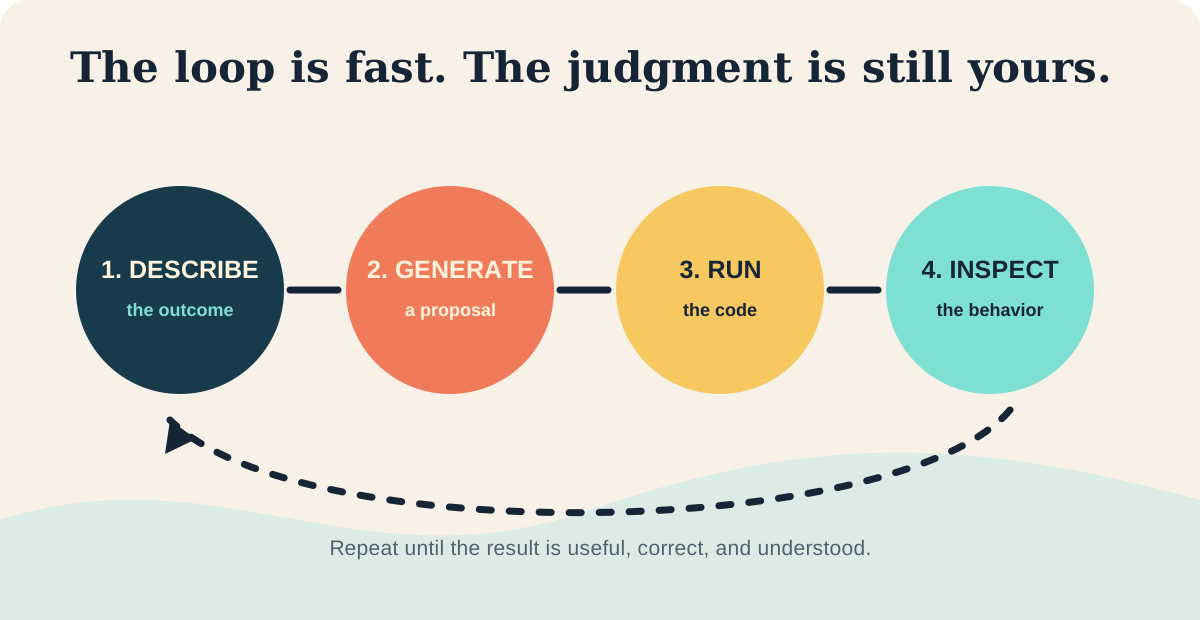
That is the loop: describe, generate, run, inspect, refine. Context controls the quality of the result. A request with constraints, existing interfaces, expected failure behavior, and examples gives the assistant more to work with than "make it production ready." That phrase is often a polite way to ask a language model to read your mind.
Why Does It Feel Like Everyone Is Doing It?
The technology became more useful as people became comfortable talking to software in plain language. Modern coding assistants can understand common frameworks, interpret error messages, and produce changes across several files. They are no longer merely completing the next line. They can participate in a conversation about a feature.
The feedback loop is faster too. A beginner can try an idea without first learning a build system, component library, database driver, and twelve configuration files. Some seem to exist mainly to test whether you are still emotionally invested in the project.
There is also a strong social reason for the trend. A finished-looking demo is easy to share. A screenshot of a polished dashboard travels further than a careful explanation of input validation.
What A Typical Vibe Coding Session Looks Like
A session often begins with an outcome rather than an implementation plan.
I need a page where a user can upload a CSV, preview the rows,
filter by status, and export the filtered result. Start with a small
working version and tell me what assumptions you are making.
The developer runs the application and checks the result. Maybe the upload works for a tiny file but freezes for a large one, or the export includes filtered-out rows. The developer pastes the error or describes the behavior, and the assistant generates another change.
Execution supplies feedback, so the model does not need to guess every detail if the developer can quickly show it what happened.
The responsible version includes review and tests along the way. The irresponsible version keeps asking for fixes until the demo looks acceptable, then calls the accumulated code an application.
Where Vibe Coding Works Well
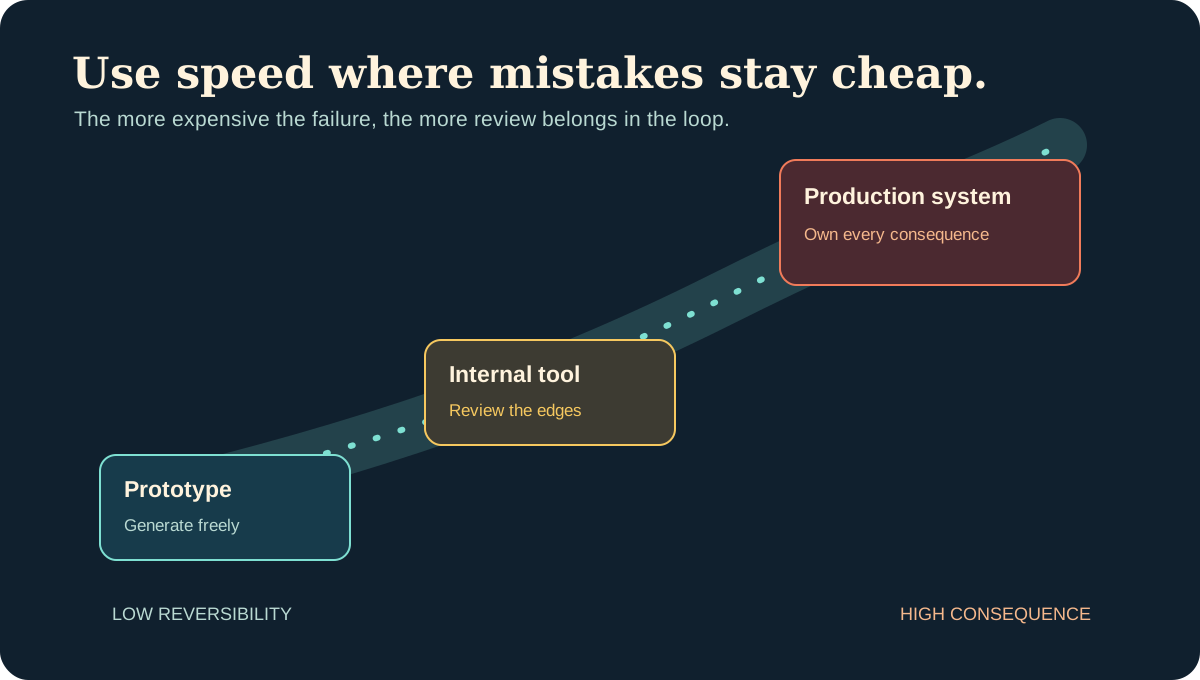
Vibe coding is useful when the cost of being wrong is low and the work is easy to replace.
Prototypes And Throwaway Experiments
If you are testing an idea, an AI assistant can create a rough interface, mock data, and basic interactions quickly enough to make the next product conversation concrete. The prototype does not need a perfect architecture, but it does need an expiration date. Do not promote a sketch into a foundation because it has a logo and a loading spinner.
Small Personal Tools
A script that renames files, converts data, summarizes notes, or checks an API can be a good candidate. If the tool saves an afternoon and can be repaired in an evening, generated code may be a good bargain.
UI Exploration
AI is effective at turning rough descriptions into interface variations, such as a denser table, an empty state, or a mobile layout. This gives a team something concrete to react to before the design is settled.
Glue Code And Learning
Small integrations, test fixtures, data transformations, and examples for an unfamiliar library are also strong use cases. Use the result as a starting point while verifying the API and adapting it to your constraints.
Generated code is excellent at removing the blank page. It is less reliable at deciding what the page should promise.
Where It Starts To Hurt
Vibe coding becomes risky when a plausible result is not enough.
Authentication is a good example. An assistant can produce a login form and a session flow that works in a local browser. That says very little about secure cookie settings, session invalidation, password reset behavior, rate limiting, account enumeration, or what happens when two tabs disagree about the user's state.
Payments have the same problem. A checkout flow can look finished while handling retries incorrectly, trusting client-provided prices, or charging twice when a request is repeated. The button is not the system.
Data migrations are another poor place for blind acceptance. A generated migration may work against a small development database and become expensive or disruptive when it locks a production table, mishandles null values, or runs in the wrong order during deployment.
Distributed systems are difficult for a related reason. The hard bugs often live between services, in timing, retries, partial failure, and stale state. Code can be syntactically correct and locally reasonable while the overall behavior is wrong.
AI-generated code can hide problems such as:
- a missing authorization check on an endpoint
- a retry loop with no backoff or limit
- a database query that becomes slow as data grows
- an error message that exposes internal details
- a dependency added for a problem the project already solved
- a test that only confirms the happy path
None of this makes AI tools useless. It makes unreviewed confidence a poor substitute for engineering.
Speed Is Not The Same As Progress
Generated code can reduce typing while increasing the amount of code that needs review. It can also introduce dependencies, abstractions, and behavior that nobody explicitly chose.
A useful way to think about the tradeoff is this:
| Work type | Useful AI role | Required human review |
|---|---|---|
| Prototype | Generate scaffolding and interface experiments | Confirm the idea and discard accidental complexity |
| Internal tool | Implement routine flows and integrations | Check data handling, access, failure behavior, and maintenance cost |
| Production system | Assist with bounded changes and investigation | Own architecture, security, tests, observability, rollout, and rollback |
A demo proves that a path exists. It does not prove that the path is safe for every user, input, retry, deployment, or future maintainer.
This is where the phrase "it works" needs a second question: under what conditions, and for how long?
A Practical Workflow That Keeps Judgment Involved
You do not need to reject vibe coding to use AI well. You need to put useful friction in the loop.
Start With Constraints
Describe the outcome and boundaries: runtime, existing APIs, data rules, accessibility requirements, performance expectations, and failure behavior. A vague request encourages a generic solution, which is often charming until it meets your codebase.
Ask For A Plan Before Large Changes
For a non-trivial task, ask the assistant to identify expected file changes, assumptions, and risks. Correct the direction before several hundred lines arrive with a confident introduction.
Make Small Changes And Read The Diff
Small changes keep mistakes cheap. Read the diff as if someone else submitted it. Look for new dependencies, changed defaults, missing validation, broad exception handling, and code that solves a problem you did not ask about.
Run Tests And Try Unfriendly Inputs
Test the empty input, the duplicate request, the expired session, the large file, the missing record, and the user who does not have permission. Software has a talent for behaving perfectly when shown only the example from the prompt.
Keep Sensitive Information Out Of Prompts
Do not paste secrets, private customer data, access tokens, or proprietary material into a tool without understanding how that tool handles the information. Convenience is not a data governance policy, no matter how pleasant the chat window looks.
Ask For Tradeoffs, Not Just Output
An assistant can generate a solution. It can also compare two approaches, explain a failure mode, propose tests, and identify assumptions. Those questions often create more value than another large code block.
Treat the generated result as a proposal that requires an owner. If nobody can explain it, test it, or maintain it, the project has not gained a feature. It has gained a future meeting.
What Vibe Coding Means For Experienced Developers
The valuable skill is shifting toward problem framing, verification, architecture, and judgment. Technical ability is being applied in a different place.
Fundamentals still matter because they help you recognize a bad answer. You need to understand state, boundaries, failure modes, security, and performance to notice when generated code is making the wrong promise.
Experienced developers may use AI more because they can give it better constraints and evaluate the result faster. They also tend to trust it less casually.
Vibe Coding Is A Mode, Not A Discipline
Vibe coding is useful. It lowers the cost of experimentation, helps people learn by building, and makes many repetitive tasks less tedious. Those are real benefits.
It is not a complete engineering discipline. It does not replace requirements, design, testing, security review, monitoring, or ownership. It cannot tell you whether a feature should exist, whether a tradeoff fits the business, or whether the team can live with the maintenance cost six months from now.
Use it where the work is reversible and the consequences of being wrong are limited. Slow down when the code handles money, identity, private data, production state, or anything another person has to depend on.
The future belongs to developers who can move quickly and still notice when the floor has disappeared.
Comments
Join the discussion on GitHub.