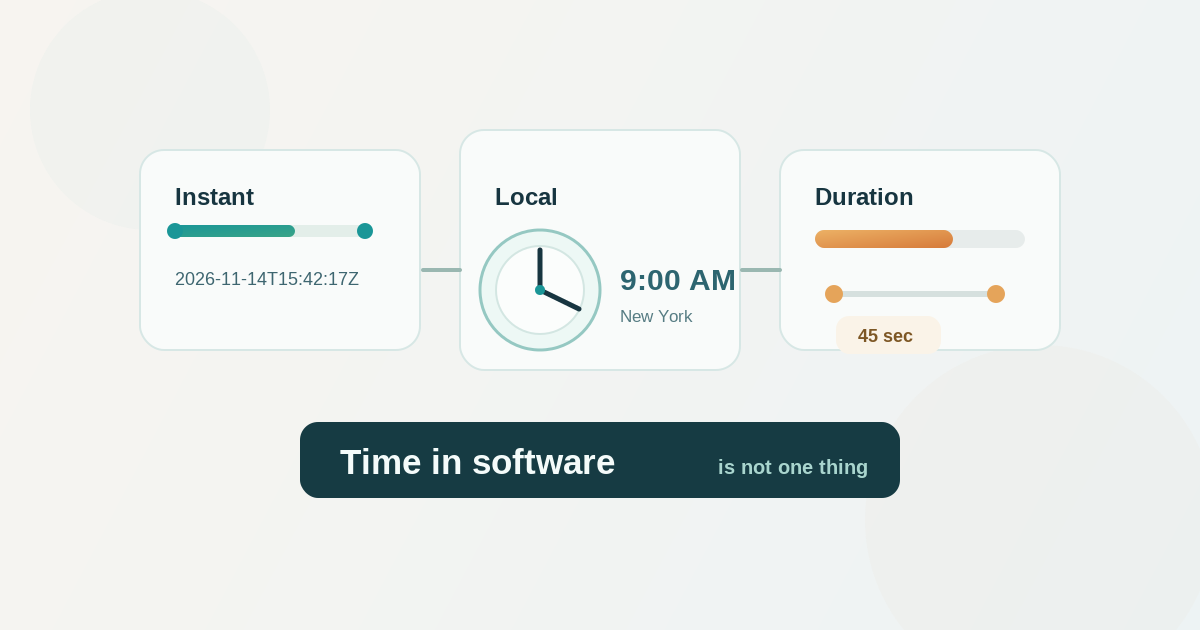
At 2:30 AM on a Sunday morning, a scheduled job runs late. A user sees a timestamp that looks wrong in their local timezone. A timeout fires after a suspiciously short delay. A log event appears to happen before the previous event even though it was written later.
These are not random bugs. They are all examples of the same underlying fact: software does not deal with one kind of time. It deals with several different meanings of time, and those meanings get mixed together all the time.
The most common mistake is to treat every value called "time" or "timestamp" as if it were the same thing. It is not. A wall clock reading, a UTC instant, a local appointment time, and a measured duration all answer different questions.
The practical lesson is simple: before you store or compare time data, decide what you actually mean.
The Core Problem: We Are Mixing Different Questions
A developer may ask one of these questions:
- When did this event happen on a global timeline?
- What time does this clock show in the user's local city?
- What date is this holiday in the user's region?
- How much time passed between these two moments?
- When should this job run next, based on local time and local rules?
All of these involve time, but they do not use the same kind of data.
A timestamp can represent an instant. A local time can represent a human-facing calendar reading. A duration can represent an elapsed period. A date can represent a calendar day without implying a precise instant. These are not interchangeable labels on the same concept.
This is why time in software is surprisingly complicated.
Three Distinct Meanings of Time
The first mental model is to separate time into three buckets.
1. An instant
An instant is a point on a shared timeline. It answers the question, "When did this happen?"
Examples:
- A payment was recorded at 2026-11-14T15:42:17Z.
- A user clicked a button at a particular UTC moment.
- A server wrote an event at a specific timestamp in its log.
An instant is usually what you want when you are storing historical events, debugging production issues, or comparing event order.
2. A local date and time
A local date and time is a clock reading in a place or context. It answers the question, "What does the clock say where the user is?"
Examples:
- 9:00 AM in New York
- 5:30 PM in London
- A recurring appointment that should happen at 8:00 PM in the user's local timezone
This is often what people naturally mean when they say "the meeting is at 3 PM". But that local wall time is not a universal instant until we pick a place and resolve its timezone rules.
3. A duration
A duration is an amount of time elapsed. It answers the question, "How long did that take?"
Examples:
- 15 seconds to finish a request
- 2 hours for a maintenance window
- 120 milliseconds of CPU time
A duration is not a timestamp. It is not a calendar date. It is a measured period.
This distinction matters because a calendar day is not always a fixed duration. A day may be 23 hours, 25 hours, or 24 hours depending on timezone transitions and the calendar system. That is one reason time arithmetic becomes subtle.
Why Wall Clocks and Monotonic Clocks Are Different
The most important distinction for developers is usually between a wall clock and a monotonic clock.
Wall clocks
A wall clock is the kind of clock that a human reads. It is usually tied to a civil time, a timezone, and a date. It answers, "What time is it on the wall?"
Wall clocks can jump forward or backward. A system may synchronize with a time server, a user may set the local time manually, or a virtual machine may temporarily restore a different time after a pause. This makes wall clocks useful for humans and for recording instants, but not ideal for measuring elapsed time.
If you measure how long a operation took using a wall clock, you can get a wrong answer when the system clock changes. A timeout that should last 30 seconds might appear to be 10 seconds or 50 seconds depending on what the wall clock did.
Monotonic clocks
A monotonic clock is designed to move forward. It is built for measuring elapsed time, not for expressing a real date or a human-friendly timestamp.
A monotonic clock is useful for:
- request timeouts
- retry delays
- benchmarking a function
- measuring how long a job runs
- scheduling relative delays inside a process
A monotonic clock is not usually something you persist to a database or display to users. It has no stable, human-facing meaning outside the current running process. It is designed to be a good stopwatch, not a calendar.
This is why engineers often say, "Use a monotonic clock for durations, and a wall clock for timestamps."
That rule is not universal, but it captures the right intuition.
UTC, Offsets, and Time Zones
Once we understand that an instant and a local time are different, we need to talk about UTC and timezone rules.
UTC is a reference for instants
UTC is a standard reference time for expressing instants across locations. It is the common language that lets systems compare event times without depending on local settings.
An example instant:
2026-11-14T15:42:17Z
The Z means the time is in UTC. This is a clear, unambiguous point on the timeline.
UTC offsets describe a local offset at a moment
A timezone offset tells you how far that local clock differs from UTC at a particular moment.
Examples:
2026-11-14T11:42:17-04:00
2026-11-14T16:42:17+01:00
These are the same instant in different local representations. The offset is a property of a specific local time and a specific instant.
Time zones are not just offsets
A named timezone such as America/New_York is not just a number. It is a set of rules that describe when local clocks shift, how the offset changes over the year, and how the region interprets civil time.
This matters because regions do not all use the same rules. Some have daylight saving time. Some do not. Some change their rules over time. That means a timestamp like 2026-03-08T02:30:00 can be ambiguous or impossible in a region depending on the transition.
A timezone database is the source of truth for those rules. Software gets more reliable when it uses proper timezone identifiers and a maintained timezone database rather than ad hoc assumptions.
Daylight Saving Time Creates Ambiguous and Missing Local Times
This is one of the most common sources of real-world bugs.
In some regions, clocks move forward in spring. In the fall, they move backward. That creates two tricky situations.
Nonexistent local times
During a spring-forward transition, a local clock may skip an hour. For example, 2:30 AM may never occur in a certain timezone on a certain date because the clock jumps from 1:59 to 3:00.
When a user says, "Schedule this for 2:30 AM on that day," the software has to decide what that means. There may be no valid instant that matches that local time.
Ambiguous local times
During a fall-back transition, a local hour repeats. The clock goes from 1:59 back to 1:00, so a local time such as 1:30 can correspond to two different instants.
When a system accepts a local appointment like 1:30 AM on a fallback day, it needs a policy. Should it mean the earlier occurrence or the later occurrence? If the user does not specify, the system may be forced to ask or pick a default.
This is why simply storing a local time in a database without timezone context can be dangerous. A local time is not enough information to know which instant it refers to unless the region and the transition rules are preserved.
A Timestamp Is Not Always a Calendar Appointment
One of the easiest ways to make a system wrong is to confuse historical moments with future local schedules.
Historical event timestamps
For an event that already happened, what you usually want is a precise instant. It should be recorded in a way that can be compared across systems. UTC is a common choice.
Example:
2026-11-14T17:45:00Z
This says, at a global reference scale, the event occurred at that instant. A user in another city can display it in their own timezone later without losing the original timeline information.
Future local appointments
For a future meeting or recurring schedule, local intent matters. If a user says, "Meet me at 9 AM in London on Friday," the system should capture the local time and the relevant timezone, not just a UTC instant that may shift if rules change later.
A future schedule may need a timezone and a policy for ambiguous or nonexistent local times. That is a different job from storing the historical timestamp of a record that was already logged.
Date-only values
A date such as 2026-11-14 can be a legitimate value. It may mean "the date in the user's local calendar" or "this is a daily cut-off date" rather than a precise instant at midnight.
Storing a date-only value as midnight UTC can silently create the wrong moment in another timezone. This is a common source of bugs in reporting and billing systems.
The general rule is: if you need a precise point in time, store an instant. If you need a calendar date, store a date. If you need a user-facing scheduled time, preserve local timezone intent and rules.
Why Clocks Drift and Why That Matters
Computers are not synchronized to a perfect global clock. Each machine has its own oscillator, and each clock can drift over time. Even when systems use NTP or other synchronization protocols, they can differ by milliseconds, seconds, or more depending on the network and the environment.
This matters because multiple machines can each record an event at slightly different local times. Those timestamps may not line up perfectly with the real-world order of events.
A lower-level lesson is this: a timestamp from one machine is evidence about what that machine believed at a point in time. It is not a guarantee of perfect global truth.
This is why distributed systems often need stronger ordering mechanisms than raw wall-clock timestamps. They may use database ordering, sequence numbers, application-level event IDs, or logical clocks depending on the problem. The issue is not that clocks are useless. The issue is that wall-clock timestamps are not a perfect substitute for causality or a total ordering of events across machines.
Measuring Duration Is a Different Skill from Storing a Timestamp
Suppose you want to know how long a function took.
Use a monotonic clock if the environment supports it. It gives you a trustworthy measurement of elapsed time within the current system. Avoid using wall-clock timestamps for this job because the wall clock can move backward or forward.
Suppose you want to know when a payment happened in a global timeline.
Use an instant timestamp, usually stored in UTC or a timezone-aware format with enough timezone context to compare and display it correctly.
Suppose you want to know when a customer should receive a reminder in their local timezone.
Store local intent and timezone rules, not just a bare UTC instant if the adjustment matters.
These are three different problems requiring three different representations.
A Quick Comparison
| Kind of value | Represents | Typical use | What it is not |
|---|---|---|---|
| Instant | A point on a shared timeline | Logging, event history, distributed system coordination | A local calendar time |
| Local date and time | A human clock reading in a location | Appointments, reminders, user-facing schedules | A universal instant by itself |
| Date only | A calendar day | Birthdays, reporting dates, daily boundaries | A precise timestamp |
| Duration | Amount of elapsed time | Timeouts, retries, measuring latency, benchmarking | A date or clock reading |
This table is not a prescription for every database schema. It is a reminder that the same word, "time," can hide several different meanings.
A Small Example of the Right Representation
Here is a conceptual example of how the same situation can be modeled in different ways:
Historical event: 2026-11-14T17:43:22Z
Local appointment: 2026-11-14T09:00:00-04:00 in America/New_York
Duration: 45 seconds
Date-only value: 2026-11-14
The first is an instant. The second is a local time with an offset and a region context. The third is a duration. The fourth is a calendar date, not a precise moment.
Notice how each one answers a different question. A system built around one of them will fail if it assumes the others are equivalent.
A Simple Decision Diagram
flowchart TD
    Q{What question are you answering?}
    Q --> A{Do you need a point on a timeline?}
    A -->|Yes| Instant[Store an instant, usually UTC or timezone-aware]
    A -->|No| B{Do you need a local calendar time for a person or schedule?}
    B -->|Yes| Local[Preserve local time and timezone rules]
    B -->|No| C{Do you need elapsed time?}
    C -->|Yes| Duration[Use a monotonic clock for the measurement]
    C -->|No| Other[Clarify the data model before storing anything]
This diagram is intentionally simple. Real systems often need more nuance, but the basic question remains the same: what kind of time is this data supposed to represent?
Practical Checklist for Time-Related Design
Before implementing any time field or scheduled behavior, ask:
- Is this an instant, a local time, a date, or a duration?
- Will the value be displayed to users or compared across systems?
- Does this need timezone rules, or is UTC enough?
- Could the local time be ambiguous or nonexistent during a transition?
- Is the measurement for elapsed time, which should usually use a monotonic clock?
- Can clocks drift or be adjusted, and does that matter for correctness?
- Do we need ordering across machines, or is a timestamp enough?
If you do not answer these questions, the odds of a subtle bug increase sharply.
The Big Lesson
Time in software is difficult because humans casually talk about one thing while software often needs several distinct models at once.
The most useful mental model is this:
- An instant answers, "When on the shared timeline?"
- A local date and time answers, "What does the clock say in this place and context?"
- A duration answers, "How much time elapsed?"
- A wall clock is good for people and for recording instants, but it is not reliable enough for elapsed-time measurement when a monotonic clock is available.
- Time zones are rule sets, not just offsets.
- A timestamp can be precise without being sufficient to express local intent.
- A local time can be meaningful without being globally comparable without timezone context.
Time bugs are common not because developers are careless, but because the concept is genuinely layered. The good news is that once you separate the questions, the right representation becomes much clearer.
That is why time in software is surprisingly complicated, and also why getting the model right is so valuable.
Comments
Join the discussion on GitHub.