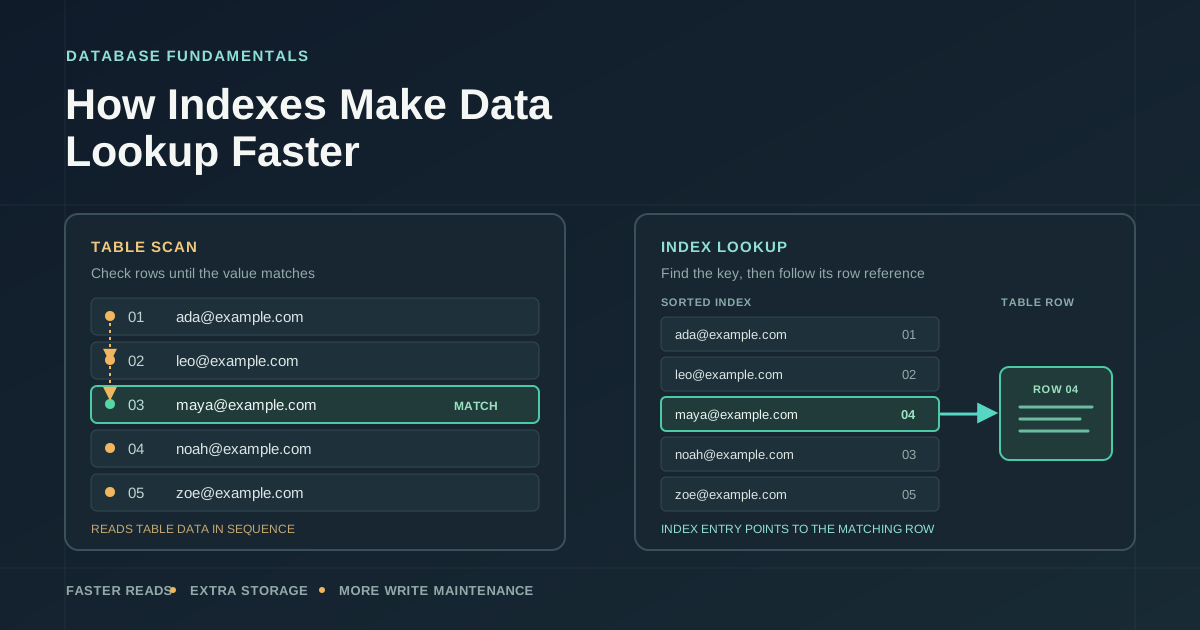
Suppose your application needs the customer with the email address maya@example.com. In a table with a few dozen rows, finding her is easy. As the table grows, the database has more data to consider. Without a useful access path, it may need to examine the rows one by one to see which email matches.
An index gives the database another route to the answer. It can make reads substantially cheaper, but it is not free: the database stores the index and keeps it up to date as the table changes. That is the basic trade-off behind database indexes. You spend storage and some write effort to avoid work on reads that matter.
What an index stores
A familiar analogy is the index at the back of a book. Instead of reading every page to find a reference to "transactions," you look up the word and follow its page number. A database index serves a similar purpose: it organizes values from one or more table columns and provides a way to locate the corresponding rows.
Conceptually, an index on a customer email might look like this:
ada@example.com   -> row location A
maya@example.com  -> row location B
noah@example.com  -> row location C
Real indexes are data structures, not handwritten lists. A common general-purpose type is a B-tree, which keeps keys in order and lets the database navigate through them. B-trees are useful for equality checks, such as finding one email, and ordered or range lookups, such as finding timestamps after a particular date. Other index types serve other kinds of queries.
The index is usually stored separately from the table's row data. Its entries contain indexed values and a reference the database can use to reach the row. The exact layout depends on the database and index type. For example, a reference might identify a physical row location, or the database may organize the table itself around an index. The important idea is that the index gives the engine a smaller, organized structure to search before it fetches the row.
Like a book index, it has limits. It only helps with the information and lookup patterns it was built to support. And unlike a book index, the database has to maintain it every time relevant data changes.
How an index avoids a full scan
Here is a simple PostgreSQL example:
CREATE INDEX customers_email_idx ON customers (email);

SELECT customer_id, name
FROM customers
WHERE email = 'maya@example.com';
Without a useful index, the database can scan the table: read rows and test each email until it finds matches. With the index, it can search the ordered email keys, find the matching entry, then use the entry's row reference to fetch the customer. If the email is not unique, it may find several matching entries and fetch several rows.
A balanced B-tree can narrow down where a key belongs instead of checking every key. In simplified terms, the number of steps to locate a key grows much more slowly than the number of entries. That does not mean every indexed query takes a predictable amount of time. Pages may or may not already be in memory, fetching table rows can require additional work, and the number of matches matters. An index is a different route through the data, not a stopwatch guarantee.
The query planner is the database component that estimates the cost of possible ways to run a query. It considers information such as the table size, the values in the data, available indexes, and how many rows the query is expected to return. It can choose an index lookup, a table scan, or another plan. Creating an index makes an option available; it does not force the planner to use it.
flowchart TD
    Q[Query for matching rows] --> D{Choose an access path}
    D -->|Scan| S[Read table rows and test values]
    S --> M1[Return matching rows]
    D -->|Use suitable index| I[Search ordered index keys]
    I --> R[Follow row references]
    R --> M2[Fetch and return matching rows]
When indexes help reads
Indexes are most useful when a query can use them to avoid examining a large amount of irrelevant data. An exact lookup on a relatively distinct value, such as a customer email, is a natural example. A range query can benefit too: a B-tree on created_at may help find orders from a particular interval. An index can sometimes provide rows in the needed order as well, depending on the index, query, and database engine.
A key idea here is selectivity: roughly, how much of the table matches a condition. If a query asks for one customer out of a million, that condition is highly selective. If it asks for every order with status = 'complete' and nearly all orders are complete, the condition is not very selective. Following an index and then fetching most of the table's rows may cost more than reading the table directly.
That is why an index on a column is not automatically useful or useless based only on the column's name or type. The values, the query, and the workload all matter. A table scan can be the right plan when a table is small, when a query returns a large share of its rows, or when reading the table sequentially is cheaper than visiting many scattered row locations.
Some queries need only values already present in an index. In that case, certain databases can answer without fetching the corresponding table rows, a strategy often called an index-only or covering lookup. It can reduce read work further, but it depends on the database, index definition, and query. It is an extra benefit, not a reason to assume every indexed query avoids the table.
| Access path | What the database does | Often a good fit | Trade-off |
|---|---|---|---|
| Table scan | Reads table data and tests rows | Small tables or queries returning many rows | Work grows with the amount of table data read |
| Index-assisted lookup | Searches index keys, then may fetch matching table rows | Selective lookups and supported ranges or ordering | Index takes space, and scattered row fetches can add work |
The cost of indexes on writes and storage
An index is a second structure that has to agree with the table. When a new customer is inserted, the database also has to add the customer's email to the email index. When an indexed email changes, the relevant index entry must change too. Deleting a row also means the index must stop pointing to it, though the details of removal and cleanup vary between databases.
One index may add little overhead for a particular workload. Many indexes can make a difference. A write-heavy table with indexes on email, phone number, postal code, signup date, and several other columns has more structures to maintain on inserts and on updates that affect those indexed values. That work can add to write latency and reduce the rate at which the database can accept changes.
Indexes also take disk space. Larger indexes can use more of the database's memory and cache, leaving less room for frequently accessed table data or other useful indexes. Some index structures need additional maintenance as they grow. A B-tree, for example, may need to reorganize parts of its structure as entries are added. These are ordinary costs the database manages, not a reason to avoid indexes altogether.
The balance depends on the workload. A table that serves a high volume of important reads and changes infrequently may be a good place for several well-chosen indexes. A table that receives frequent writes may need a stricter case for each one. The question is not whether indexes slow writes in the abstract. It is whether the read work they save is worth the storage and maintenance for this data and these queries.
Why more indexes are not always better
It is tempting to add an index to every column that appears in a WHERE clause. That approach can leave you with indexes no important query uses, overlapping indexes that serve almost the same purpose, or structures that cost more to maintain than the reads they save.
Queries often use more than one column. For example, an orders screen might show a customer's newest orders. A composite index on (customer_id, created_at) could be a candidate for a query that filters by customer and orders by date. In a PostgreSQL B-tree, the order of columns matters: the leading column is central to which lookups the index can support efficiently. Other database engines have their own rules and options, so check the documentation and actual plan for the engine you use.
A proposed index should match a real query shape, not just contain a column mentioned somewhere in the SQL. If the query applies a transformation to a value, uses a predicate the index does not support, or returns so many rows that the index path is more expensive, the planner may not use a regular index on that column. Databases offer specialized and expression indexes for some cases, but those add more design and maintenance choices. They are worth exploring when a measured query calls for them, not as a starting assumption.
A practical way to choose an index
Start with a query that matters: one that is frequent, slow, or expensive for a reason you can observe. Look at its filters, joins, and ordering. Then inspect the execution plan using your database's plan tool. The plan can show whether the engine scans a table or uses an index, and often how many rows it expects to process. Some tools can also show what happened during execution.
Test with data that resembles the real table. A plan that looks good with a few hundred development rows may change when the table has millions of rows or a different distribution of values. Measure both sides of the trade: did the read improve, and did inserts or updates become more costly? Keep in mind that caching, concurrent traffic, and changing statistics can affect results.
Before adding an index, ask:
- Which important query is this meant to help?
- How many rows does its condition match in representative data?
- Does the index fit the query's filters, joins, or ordering?
- Which writes will need to maintain it, and how much storage will it use?
- Does the execution plan and a representative measurement show a worthwhile improvement?
An index is useful when it saves meaningful work for a query the application actually runs. It is overhead when it sits unused or costs more to maintain than the reads justify. The point is not to maximize the number of indexes. It is to give the database a better path for the lookups that matter, and to pay for that path with your eyes open.
Comments
Join the discussion on GitHub.