Part 1 introduced Linux as a kernel surrounded by user-space software. Part 2 showed how developers use the shell to inspect files, permissions, streams, and processes.
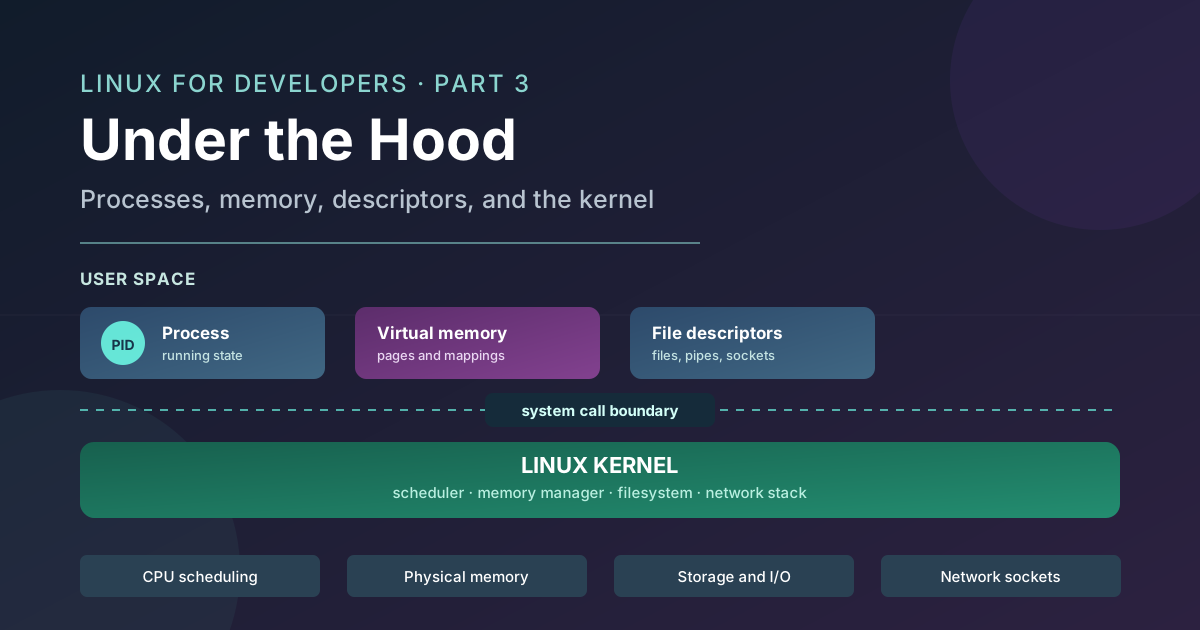
This final article goes underneath those commands. It explains what happens when a program starts, how Linux shares CPU time, why processes use virtual memory, why a socket appears as a file descriptor, and how containers isolate processes without a separate kernel.
You do not need to know C, assembly, or kernel development. The goal is practical reasoning: form a useful hypothesis before changing a random setting when a service is slow, stuck, using too much memory, or unable to accept connections.
From a Command to the Kernel
A shell command looks simple from the outside. You type a name, press enter, and see output. Underneath, several layers cooperate.
The shell parses the command, expands variables and paths, and usually creates a process for the program. The program runs in user space and calls libraries. When it needs an operating-system service, such as opening a file or sending data through a socket, a library wrapper crosses the system-call boundary into the kernel.
A system call is an interface between user-space code and kernel services. It is not merely an ordinary function call. The processor changes execution context and the kernel validates the request before operating on privileged state. The exact mechanism depends on the processor and operating system, but the design goal is stable: applications ask, and the kernel decides whether and how the request can be fulfilled.
flowchart LR
    A[User-space program] --> B[Library wrapper]
    B --> C[System call boundary]
    C --> D[Linux kernel]
    D --> E[Filesystem]
    D --> F[Network socket]
    D --> G[CPU and memory]
    D --> H[Device]
This boundary prevents a normal application from directly controlling hardware or freely inspecting another process's memory. A program can request memory, but the kernel maps it into the process's address space. It can request a file, but the kernel checks the path and permissions. It can request a socket, but the kernel tracks the connection and enforces the networking rules.
The boundary is also why a user-space crash usually terminates one process rather than taking down every program on the machine. Isolation is not absolute, and kernel bugs can affect the whole system, but ordinary application code does not run with unrestricted kernel privileges.
How a Program Becomes a Process
An executable file is not the same thing as a running program. The file contains instructions and data. A process is the kernel-managed execution context created when those instructions are loaded and started.
A process has a process ID, or PID, and a collection of state that includes:
- a virtual address space
- CPU register state and scheduling information
- environment variables and command-line arguments
- a current working directory
- user and group identity
- open file descriptors
- a relationship with a parent process
The process can be running, waiting for an event, stopped, or exiting. The kernel uses this state to schedule it, enforce access, and account for resources.
Fork and Exec as a Mental Model
Unix-like systems traditionally separate creating a process from replacing the program it runs. The classic concepts are fork and exec.
- Fork creates a child process based on an existing process. The child receives a new PID and initially inherits much of the parent's state.
- Exec replaces the current process's program image with a different executable. The PID remains the same, but the instructions and memory layout change.
A shell can use this pattern when you type a command: it creates a child, the child prepares its streams and environment, and then the child replaces itself with the requested program. The shell remains available to accept another command after the child exits or moves into the background.
The word "copy" in this explanation needs care. The child does not necessarily copy every physical memory page immediately. Linux can use copy-on-write: parent and child initially share pages marked so that a write causes a private copy to be created. This makes process creation more efficient, especially when the child quickly replaces its program through exec.
A conceptual child launch might look like this:
parent shell
  -> create child process
  -> child inherits environment and standard streams
  -> child replaces its program with example-worker
  -> parent waits, or continues if the job is in the background
Inherited environment and descriptors explain why a shell-launched command can see variables, use the current directory, and write to the same terminal. The child is new, but starts with selected state from its parent.
Process States
A process is not running or dead. It may be:
- Runnable: ready to use a CPU or currently executing.
- Sleeping or blocked: waiting for an event such as disk data, network input, a timer, or another process.
- Stopped: paused by a signal or debugging operation.
- Zombie: finished execution, but its parent has not collected its exit status.
A sleeping process is not necessarily unhealthy. A server waiting for a network request may use almost no CPU. A runnable process that receives little CPU time may have a scheduling or contention problem instead.
A zombie is also not a process continuing to consume normal execution resources. It is a small record retained so the parent can learn how the child exited. If many zombies accumulate, the parent may be failing to collect children correctly or may itself be unable to manage its process lifecycle.
stateDiagram-v2
    [*] --> Created
    Created --> Runnable: process is launched
    Runnable --> Running: scheduled on a CPU
    Running --> Runnable: preempted or yields
    Running --> Sleeping: waits for I/O or event
    Sleeping --> Runnable: event completes
    Running --> Stopped: stop signal or debugger
    Stopped --> Runnable: continue signal
    Running --> Exiting: program finishes
    Exiting --> Zombie: parent has not collected status
    Zombie --> [*]: parent collects exit status
How Linux Schedules Work
A CPU core can execute only a limited number of instruction streams at one instant, but a server may have many runnable processes and threads. The scheduler decides which runnable task gets time on which core.
On a multicore machine, several tasks can genuinely execute at the same time. The scheduler still needs to share each core among runnable tasks, and it must account for priorities, fairness, affinity, and other policies. A context switch changes the CPU's active execution context from one task to another. Context switches are necessary, but they have overhead because the kernel must save and restore state and the processor's caches may become less useful for the new task.
This gives CPU utilization a more precise meaning. A process using a CPU may be computation-bound, while one using little CPU may be waiting for storage, network input, a lock, or a timer. A machine can feel slow from I/O latency or contention even when average CPU usage looks modest. High CPU can also be expected for a batch job.
Fairness also does not mean that every request receives the same response time. A service can have enough total CPU capacity while individual requests wait behind a busy queue, a lock, or a process with different scheduling characteristics. When investigating latency, look at runnable work, wait states, per-process usage, and application metrics rather than relying on one overall percentage.
Virtual Memory
Each process runs in a virtual address space. The addresses used by the process are not direct physical locations in RAM. The kernel and the processor's memory-management hardware translate virtual addresses to physical memory through page tables.
Memory is managed in fixed-size units called pages. A process can have a virtual page that is currently mapped to physical RAM, shared with another process, backed by a file, or not yet loaded. This indirection gives the kernel several useful properties:
- one process cannot normally address another process's memory directly
- shared libraries and mapped files can be reused across processes
- memory can be allocated in pieces rather than as one physically contiguous range
- unused pages can be reclaimed or moved according to memory pressure
A process's virtual address space commonly includes executable code, shared libraries, the heap, the stack, and memory-mapped files. The exact layout varies, but these categories are useful when reading diagnostics.
Page Faults and Swapping
A page fault occurs when a process accesses a virtual page that needs kernel attention. This is not automatically an error. The page may simply be allocated lazily, mapped from a file for the first time, or present in memory under conditions that require a page-table update.
A major page fault requires slower storage I/O, such as bringing a page back from swap or reading a mapped file. A high rate of major faults can create latency because the process is waiting on storage rather than executing instructions. The practical question is not "are there page faults?" but "what kind, how often, and what is the application waiting for?"
Swap gives the kernel another place to move some memory pages under pressure, but it is not equivalent to adding fast RAM. If a workload repeatedly needs pages that have been moved to storage, it can spend much of its time waiting for I/O.
A process's virtual size is not the same as its current physical RAM use. A runtime may reserve an address range without touching every page, shared libraries may be counted differently, and copy-on-write pages may remain shared. Treat memory reports as measurements with definitions, not one universal answer.
File Descriptors: More Than Files
A file descriptor is a small integer maintained by a process that refers to an open kernel-managed resource. The integer is only a handle. The kernel stores the object and its state behind it.
Regular files can be represented by descriptors, but so can terminals, pipes, sockets, and other communication endpoints. The same broad operations, such as reading and writing, can work across different resource types while the kernel supplies the appropriate behavior.
The first three descriptors have conventional meanings:
- descriptor 0 is standard input
- descriptor 1 is standard output
- descriptor 2 is standard error
When the shell builds a pipeline, it creates a pipe and connects one process's stdout to another process's stdin. When a program opens a network connection, the returned socket descriptor becomes the process's handle for reading and writing that connection.
A descriptor is process-local. Descriptor 5 in one process has no reason to refer to the same resource as descriptor 5 in another process. A child can inherit descriptors from its parent, which is why a launched command can continue writing to the terminal or a redirected log file.
Blocking and Non-Blocking I/O
A read from a descriptor may block when no data is available. The process sleeps until data arrives or the operation is interrupted. This is normal for a server waiting for a request.
A descriptor configured for non-blocking I/O returns control instead of waiting when the operation cannot proceed immediately. Applications can then use an event mechanism or retry strategy to manage many connections. The details differ between runtimes and APIs, but the underlying decision is the same: wait inside the kernel, or let the application decide what to do next.
Descriptor leaks happen when a process opens resources and fails to close them. The disk can have plenty of free space while a service is unable to accept another connection because it has reached a per-process or system descriptor limit. This is why descriptor counts belong in a resource investigation alongside CPU, memory, and disk usage.
Networking From the Process Perspective
A server does not receive network traffic through a magical application-specific channel. It uses kernel networking interfaces, usually through a sequence of socket operations.
Conceptually, the server:
- creates a socket
- binds it to a local address and port
- marks it as listening
- accepts incoming connections
- reads requests and writes responses through connection descriptors
The listening socket and each accepted connection are different descriptors. The listening descriptor represents the endpoint waiting for new connections. An accepted descriptor represents one particular client connection.
flowchart LR
    C[Client] --> N[Kernel network stack]
    N --> L[Listening socket]
    L --> S[Server process]
    S --> A1[Connection fd 7]
    S --> A2[Connection fd 8]
    A1 --> C1[Client connection 1]
    A2 --> C2[Client connection 2]
The TCP and HTTP concepts from the web series sit above these interfaces. TCP provides transport behavior, while the application reads and writes bytes through descriptors and interprets them as HTTP messages.
The service process may still be alive and answering health checks while being unable to accept useful traffic. It may have exhausted descriptors, reached a backlog limit, run out of connection memory, or be unable to schedule work quickly enough. A present process is only one part of service health.
Tools such as lsof can help connect process IDs to open files and sockets, subject to permissions and platform-specific output.
lsof -p 12345
lsof -iTCP -sTCP:LISTEN
Use a real PID and narrow the query when possible. These commands are observations. They do not fix a descriptor leak or close connections automatically.
What Containers Isolate, and What They Do Not
A container uses Linux kernel features to give a process a constrained view of the system and controlled access to resources. It does not normally carry a separate kernel.
Namespaces change what a process can see. A process may have its own process ID view, network interfaces, mount points, hostname, or user mapping. Cgroups group processes for resource accounting and limits, such as CPU time or memory.
flowchart TD
    A[Container process] --> N[Namespaces: what it can see]
    A --> G[Cgroups: what it can consume]
    N --> K[Shared host Linux kernel]
    G --> K
    K --> R[Host CPU, memory, storage, and network]
The shared-kernel model is important. A container can have a separate-looking filesystem view, but its processes still depend on the host kernel. A process can hit its cgroup memory limit while the host has free memory because the limit applies to the process group.
This is also why container debugging benefits from Linux knowledge. A container restart may hide a process lifecycle problem without fixing it. A memory limit may be enforcing the behavior correctly. A missing file may be absent from the container's mount namespace even though it exists on the host. The useful question is always which namespace and resource boundary is involved.
A Practical Diagnosis Model
The goal of diagnosis is to connect symptoms to the layer most likely responsible.
CPU-Bound or I/O-Bound?
A CPU-bound process is spending much of its time executing instructions. An I/O-bound process is often waiting for storage, network data, or another event. ps and top can show CPU usage and process state, while application metrics explain whether the work is useful or stuck.
High CPU may be expected for a computation-heavy job. Low CPU does not prove the service is healthy if requests are waiting on slow storage or a blocked dependency.
Memory Pressure or a Memory Leak?
Memory pressure means the system or a resource group is short of usable memory and may reclaim pages, swap, or terminate processes according to policy. A memory leak is an application behavior where memory that is no longer needed remains reachable or allocated.
A growing resident set may indicate a leak, a cache, increased workload, shared-page changes, or normal runtime behavior. Compare process memory with request volume, heap metrics, restart history, and system pressure before choosing a fix.
Blocked or Crashed?
A blocked process still exists and may be waiting for an event. A crashed process has exited or been terminated. Process state, logs, exit status, supervisor behavior, and open resources help distinguish them.
Restarting a blocked process may restore service temporarily while hiding the dependency or resource problem that caused the wait. A crashed process needs a different investigation, usually starting with its logs and exit reason.
Descriptor Exhaustion or Disk Exhaustion?
Both can appear as an inability to create or write things, but they are different resources. df and du help inspect disk capacity and usage. lsof and process limits help inspect open descriptors. A service can have plenty of disk and still fail because it cannot open another socket or file.
Useful observation commands include:
ps -o pid,ppid,stat,%cpu,%mem,cmd -p 12345
top
lsof -p 12345
cat /proc/12345/status
/proc is a kernel-provided interface, so its contents are system-specific and should be read as observations rather than ordinary durable files. Inspect the process state, memory fields, parent PID, descriptor count, and application logs together. One command rarely identifies the cause by itself.
Before changing configuration, write down the symptom, the resource involved, and the evidence supporting your current hypothesis. Then make the smallest reversible change that tests it. This habit is slower than copying a tuning command for the first thirty seconds, but much faster than debugging several unrelated changes afterward.
Closing the Series
The Linux mental model from Part 1, the daily tools from Part 2, and this article's internals describe the same system at different levels. A shell launches a program, the program becomes a process, and its system calls cross into the kernel. The kernel schedules its work, maps memory, opens files and sockets, and enforces boundaries between programs.
That model turns vague symptoms into questions. When a service misbehaves, ask whether the problem is computation, memory, I/O, scheduling, descriptors, or the boundary between the process and the kernel before reaching for a random configuration change.
Comments
Join the discussion on GitHub.