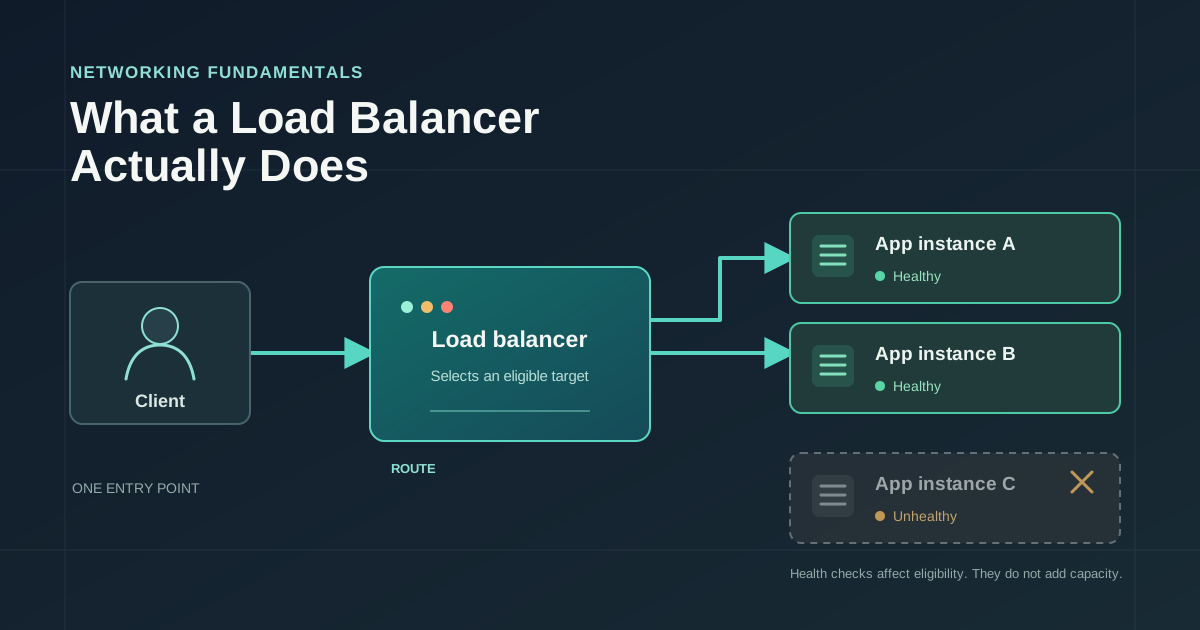
A web service can run on several application instances at once, but clients still need somewhere to send requests. You could give every client the address of every instance and ask it to pick one. That would make each client responsible for tracking which instances exist, which ones are healthy, and when the list changes. Most systems put a load balancer in front instead.
The balancer gives clients one stable destination and forwards traffic to a configured backend. The details matter: it may route a whole network connection or an individual HTTP request, its health checks measure specific signals, and distributing work does not create more capacity.
What Happens to a Request
A client resolves the service's public name and connects to its address. That address belongs to, or leads to, the load balancer. The balancer selects an eligible application instance and forwards the connection or request to it. The application does its work, perhaps querying a database, and sends a response back through the balancer to the client.
flowchart LR
    C[Client] -->|Request| LB[Load balancer]
    LB --> A1[App instance A]
    LB --> A2[App instance B]
    LB -. health check .-> A1
    LB -. health check .-> A2
    A1 --> DB[(Database)]
    A2 --> DB
    A3[App instance C] -. unhealthy .- LB
Clients talk to one entry point, while the balancer chooses among backends. It can hide backend addresses and let operators add or remove instances without updating every client.
But "the balancer forwards the request" can mean different things. A network-level, or Layer 4, balancer works with transport information such as IP addresses, ports, and whether a connection uses TCP or UDP. It can select a target for a connection without reading an HTTP URL or its headers.
An application-level, or Layer 7, balancer understands application protocols such as HTTP. Depending on its configuration, it can route requests based on the hostname, path, or selected headers. For example, requests for /api might go to one service and requests for /images to another. To inspect HTTPS traffic, it generally needs to terminate TLS at the balancer, or otherwise have access to the relevant request information.
These labels are useful, but real systems vary. Some combine functions, and a Layer 4 balancer can pass encrypted traffic through without seeing HTTP contents. The distinction that matters is what information the routing decision can use.
How the Balancer Chooses a Target
Once a balancer has a set of eligible targets, a selection policy decides which one gets traffic. The policy does not necessarily identify the fastest server or measure how much work each instance can handle. It uses a configured rule and whatever signals are available to it.
| Policy | How it selects | Where it can mislead |
|---|---|---|
| Round robin | Takes the next eligible target in sequence | Treats requests as roughly equal, even when their costs differ |
| Weighted distribution | Sends a larger share to targets with higher configured weights | Weights need to reflect capacity or rollout intent and may need adjustment |
| Least connections | Favors a target with fewer active connections | Connection count is only a rough proxy for work |
Round robin is easy to reason about. If three targets are eligible, requests are assigned to them in turn. It can distribute a large number of similar, short requests reasonably evenly. It has no way to know that one request takes a few milliseconds while another runs a report for several seconds.
Weighted distribution gives targets different shares. A larger instance might receive more traffic than a smaller one, or a new version might receive a small share during a gradual rollout. A weight is an instruction, not a live measurement of capacity. If traffic or workload changes, yesterday's sensible ratio might no longer be sensible.
Least connections favors the target with fewer active connections. This can help when connections have different lifetimes, but it does not directly measure CPU, memory, queue depth, or request latency. With HTTP keep-alive, one connection can carry multiple requests over time. With long-lived connections, a target may have many open connections that are mostly idle. The policy's usefulness depends on whether connection count tracks the kind of work your service is doing.
Some systems also use hashing to send a client or key to a repeatable target. That can help preserve affinity, but a hash is not a measurement of load either. Every policy makes a different tradeoff. None guarantees that work is evenly distributed in the sense that matters to your application.
Health Checks Decide Who Is Eligible
A balancer needs some way to decide whether a target should receive new traffic. An active health check periodically sends a probe, such as a request to a health endpoint, and evaluates the response. A passive health check, where supported, infers trouble from real traffic, such as repeated connection failures or errors.
If a target fails the configured policy, the balancer can mark it unhealthy and stop assigning it new work. It may add the target back after it passes later checks. Exact timing, thresholds, and treatment of existing connections vary by implementation, so a failed probe does not imply that every in-flight request is immediately terminated.
A useful health check answers a specific question. Liveness asks whether the process is running. Readiness asks whether it should receive traffic now. A process can be alive while it is still starting, has no usable worker capacity, or cannot perform the operations required for requests. Readiness is often the more useful signal for target selection, but it needs careful boundaries.
For example, suppose every application instance depends on the same database. If each readiness check fails whenever the database has a brief interruption, every instance might be removed from rotation at once. The balancer then has no eligible targets, even if some application routes could still answer or recover as the database comes back. Health checks should reflect whether an instance can serve the intended traffic, with deliberate timeouts and failure thresholds. A passing check is still only a narrow signal. It does not prove that every endpoint works or that the instance has spare capacity.
Here is the basic sequence. The exact probes and recovery rules depend on configuration, but the routing consequence is the important part:
sequenceDiagram
    participant LB as Load balancer
    participant A as App instance A
    participant B as App instance B
    participant C as Client

    LB->>A: Health check
    A--xLB: Probe fails
    Note over LB,A: A becomes ineligible after configured failure policy
    C->>LB: Next request
    LB->>B: Forward to eligible target
    B-->>LB: Response
    LB-->>C: Response
Health checks help avoid targets that have signaled trouble. They do not repair a process, replace a failed dependency, or explain why requests are failing. Those jobs belong elsewhere.
Sticky Sessions and Application State
A sticky session, also called session affinity, is an attempt to send repeated requests from the same client or session to the same backend. A balancer might use a cookie to identify the session, or use a deterministic hash of some client information. The mechanism varies, but the goal is similar: make a later request more likely to return to the same instance.
Affinity can be useful when an application keeps session data only in its own memory. If a user logs in through instance A, a later request sent to instance B may not find that session. Keeping the user on A avoids that particular mismatch while A remains available.
The tradeoff is that traffic can become uneven. One instance may collect many active users while others are underused. If that instance fails, its clients may be sent elsewhere and discover that their in-memory session state is gone. Stickiness can therefore make a system feel reliable during ordinary routing while making the failure behavior more surprising.
Cookies do not, by themselves, determine whether an application is stateful. They can carry an identifier that points to session data stored in a shared database or cache, or they can contain data that the application validates. The key question is where the state lives and whether another instance can access or reconstruct it.
When requests should be able to move freely among instances, teams commonly put session state in a shared store or design the application so that the necessary state travels with each request in a secure, verifiable form. Sticky sessions are not automatically wrong, but they are a tradeoff, not a substitute for deciding how state and failure should work.
TLS Termination and Request Identity
Some Layer 7 balancers terminate TLS. The client's encrypted connection ends at the balancer, which can inspect the HTTP request and create a separate connection to the backend. That second connection may also use TLS, or it may use another protected network path. Encryption from the client to the balancer does not, by itself, guarantee encryption from the balancer to the application.
A proxy can also pass information such as the original client address and whether the client used HTTPS through forwarded headers. Since a client can send headers of its own, applications should only trust these values when they arrive from a known, trusted proxy. Otherwise, a request can claim an address or scheme it did not actually use.
What a Load Balancer Cannot Fix
A balancer can distribute requests among the targets it has been configured to use. It does not create application capacity. If all instances are saturated, sending each one a share of the same excess traffic still leaves the system saturated. Adding instances requires scaling or deployment machinery outside the basic act of balancing, and it helps only if the bottleneck can scale too.
That last condition is easy to miss. If every application instance waits on the same overloaded database, adding more application instances can increase the number of concurrent database queries and make the bottleneck worse. A balancer does not make a slow query faster, add database capacity, or make an unavailable shared dependency available.
Nor does a balancer automatically decide how to fail over across regions, scale up before a traffic spike, or provide its own redundancy. Those behaviors can be built around it, but they require additional configuration and systems. If the balancer itself runs as one failure-prone instance, it can become the single point through which all traffic must pass. Production architectures account for the availability of that entry point too.
Retries deserve care as well. If a request fails and clients or proxies all retry immediately, the extra traffic can land on the remaining targets while they are already struggling. Retries should be bounded and paired with timeouts and suitable overload behavior. They are a recovery tool for some failures, not a way to turn an unhealthy service into a healthy one.
The distinction is simple: a load balancer distributes work; the wider system must provide capacity, recovery, and resilience. Treating those as the same job leads to systems that look redundant in a diagram but still fail around one shared bottleneck.
A Practical Troubleshooting Checklist
When requests are slow or failing, check the whole path rather than assuming the selection policy is at fault:
- Are the expected targets healthy and eligible, and are failures concentrated on one target?
- Is traffic reaching all targets as the configured policy intends?
- Are requests roughly comparable in cost, or are long-lived connections and expensive operations skewing the distribution?
- Are latency and errors coming from the application instances, or from a shared dependency such as a database?
- Are retries increasing traffic during the failure, and are timeouts bounded at each hop?
- Does the health check test readiness for real traffic, without making every instance fail because of one shared transient dependency?
- Is the balancer itself deployed with the availability the service requires?
A load balancer provides a stable entry point and applies a routing policy to eligible backends. Knowing what it observes and where its responsibility ends makes the system behind it easier to diagnose.
Comments
Join the discussion on GitHub.