Your API was running fine last Tuesday. You deploy a new feature Wednesday morning, traffic starts climbing, and suddenly every response takes 3 seconds. The on-call engineer — you — opens their laptop to find 50 alerts, a slow query log full of the same SELECT statement, and a message from your CTO that just says "what's happening."
You add Redis. Things calm down. You ship it and move on.
Two weeks later, a user reports that their profile still shows their old email after they changed it. You trace the bug. The cache is holding stale data with a 10-minute TTL and nothing invalidates it on update.
This is the caching trap. Adding a cache felt like a win. It was. But you traded one problem for a different one, without realizing it.
This article is about what comes after "add Redis." The part most tutorials skip: how caches fail in production, what the real trade-offs are, and the decisions that separate systems that stay healthy from ones that silently degrade.
The One Mental Model That Matters
Before patterns and tools, you need one idea to hold onto:
Caching trades correctness for speed.
That's it. When you cache something, you're saying: "I'd rather serve slightly stale data fast than fetch fresh data slowly." That's often the right call. But it needs to be a deliberate decision — not an accident.
Every caching decision has three dimensions:
Latency — How much faster does this actually make things? If a database query takes 4ms, caching it saves almost nothing. If it takes 1,200ms, caching it changes the user experience entirely.
Freshness — How often does this data change? A product name changes once a year. An order total changes on every checkout. Your TTL should reflect reality, not convenience.
Cost — What does caching this actually cost? Memory is not free. Caching 5MB of data per user at 100,000 users is 500GB. Think before you cache everything.
If you can't answer all three for a piece of data you want to cache, stop and figure that out first.
The Three Types of Caching
In-Memory Cache
This lives inside your application process. A Map in Node.js, a dictionary in Python, a sync.Map in Go.
Use it for: Static configuration, feature flags, lookup tables — anything that changes rarely and needs to be accessed thousands of times per second.
Don't use it for: Anything that needs to be consistent across multiple instances of your service. If you run 10 pods and pod A updates a feature flag, pods B through J still serve the old value until their TTL expires or they restart.
Real example: A list of valid country codes loaded from the database at startup. It changes once every few months. Cache it in memory for 1 hour. If a stale value hangs around across a few pods during a deploy, the business impact is zero.
Distributed Cache
This is Redis, Memcached, DragonflyDB — anything external to your process. All instances of your service share it.
Use it for: Session tokens, user preferences, computed aggregates — anything that changes periodically but needs consistency across service replicas.
Don't use it for: Single-instance services (you're adding a network hop for no reason), data that changes every second (you'll spend more time invalidating than serving hits), or simple queries that already return in under 5ms.
Real example: User session data. All 20 replicas of your auth service read from and write to the same Redis instance. A user logs in on replica 3, and replica 17 can see the session immediately.
CDN and Edge Caching
CDNs like Cloudflare, Fastly, or Vercel Edge sit between users and your servers, caching HTTP responses from locations close to your users.
Use it for: Public content that doesn't change per user — landing pages, blog posts, documentation, images.
Don't use it for: Authenticated or user-specific responses. This is where teams accidentally cache private data. If your API returns Cache-Control: public on a response that includes user.email, you've just leaked that email to other users through the CDN.
Real example: A product page with Cache-Control: public, max-age=3600, stale-while-revalidate=86400. The CDN serves it to 10,000 users without touching your origin server once.
The Four Patterns You'll Actually Use
Cache-Aside (Lazy Loading)
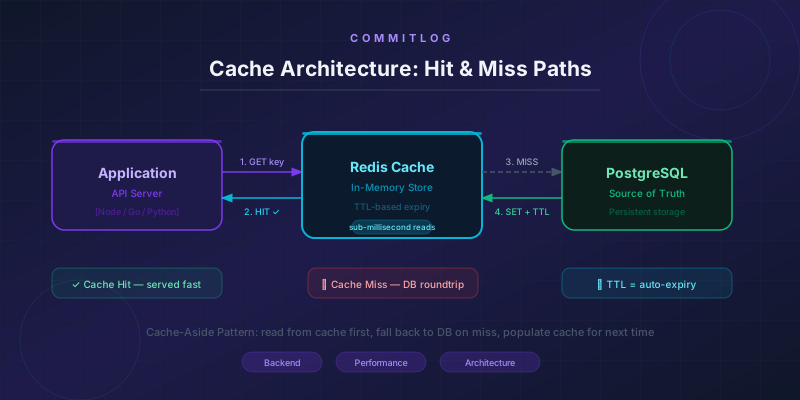
The application checks the cache first. On a miss, it fetches from the database and populates the cache. This is the most common pattern you'll encounter in real codebases.
sequenceDiagram
    participant App
    participant Cache
    participant DB

    App->>Cache: GET user:123
    Cache-->>App: MISS
    App->>DB: SELECT * FROM users WHERE id = 123
    DB-->>App: {id: 123, name: "Alice"}
    App->>Cache: SET user:123 TTL=300s
    App-->>App: Return data
    Note over App,Cache: Second request
    App->>Cache: GET user:123
    Cache-->>App: HIT — {id: 123, name: "Alice"}
Pros: Simple. Only caches data that's actually requested. The cache never holds data nobody needs.
Cons: The first request after a miss is slow — two hops instead of one. The cache can go stale if the source updates and the key isn't explicitly invalidated.
Best for: Read-heavy workloads where not all data needs to be pre-warmed. User profiles, product details, computed summaries.
Write-Through
Every write to the database is immediately written to the cache as well. The application always writes to both.
sequenceDiagram
    participant App
    participant Cache
    participant DB

    App->>DB: UPDATE users SET name = "Bob" WHERE id = 123
    DB-->>App: OK
    App->>Cache: SET user:123 {name: "Bob"} TTL=300s
    Cache-->>App: OK
    Note over App,Cache: Next read
    App->>Cache: GET user:123
    Cache-->>App: HIT — {name: "Bob"}
Pros: Cache is always fresh after a write. No stale reads immediately following an update.
Cons: Every write pays the cost of writing to two places. If you write frequently but reads are rare, you're filling memory with data nobody requests.
Best for: User settings, profile data — things written occasionally but read on every page load.
Write-Back (Write-Behind)
The application writes to the cache first. The cache asynchronously flushes to the database in batches.
Pros: Writes are extremely fast. If you have hundreds of writes per second, your database sees far fewer round trips.
Cons: If the cache crashes before flushing, you lose data. This is a real durability risk. Most teams should not use this unless they've explicitly decided to accept potential data loss.
Best for: Event counters, analytics aggregations — situations where losing a few seconds of writes is acceptable and the write volume is very high.
Read-Through
Similar to cache-aside, but the cache layer is responsible for fetching from the database on a miss — not the application. Your app always talks to the cache.
Pros: Application code stays clean. It never directly calls the database.
Cons: Requires a smart caching layer that understands your data model. Standard Redis clients don't do this out of the box.
Best for: Systems where you want to abstract the database behind a unified data access layer.
Here's Where Things Break
This is the section that actually matters.
Cache Invalidation
Phil Karlton famously said there are only two hard problems in computer science: cache invalidation and naming things. He was right.
TTL-based invalidation is the simple approach. You set an expiry time and accept that data might be stale for that long. It works for data that changes infrequently. It breaks when users notice. If you cache a product's price for 10 minutes and the price drops, someone might see — and pay — the old higher price.
Manual invalidation is when you explicitly delete a cache key after a write. More correct, but it adds coupling. Your update logic must know every cache key that holds that data. Miss one and the bug is silent.
Event-driven invalidation is the right approach at scale. A user.updated event on a message queue triggers cache invalidation across every service that caches user data. It decouples the write from the invalidation but adds infrastructure complexity.
Here's the uncomfortable truth: most caches don't track what data they depend on. When Alice updates her display name, which cache keys need to be cleared? Her user profile? Her public page? Every comment thread where her name appears? Every activity feed entry?
You can't know without explicitly maintaining dependency mappings — and most systems don't. This is why invalidation is actually hard. It's not algorithmically difficult. It's hard because the cache doesn't understand your data model.
Cache Stampede (Thundering Herd)
This one will take down your database if you're not ready for it.
Your popular product page is cached with a 5-minute TTL. The key expires at 3pm, right when traffic peaks. In the next 200 milliseconds, 800 requests arrive. All 800 see a cache miss. All 800 hit the database simultaneously.
sequenceDiagram
    participant R1 as Request 1
    participant R2 as Requests 2–800
    participant Cache
    participant DB

    R1->>Cache: GET product:42 — MISS (key expired)
    R2->>Cache: GET product:42 — MISS (key expired)
    Note over R1,R2: 800 concurrent requests race to the DB
    R1->>DB: SELECT * FROM products WHERE id = 42
    R2->>DB: SELECT * FROM products WHERE id = 42
    Note over DB: Overwhelmed — query time climbs from 10ms to 8s
    DB-->>R1: data (eventually)
    DB-->>R2: data (eventually)
Mitigation 1: Jitter on TTLs. Instead of a fixed TTL like 3600, use 3600 + Math.floor(Math.random() * 300). This spreads out expirations so they don't all happen at the same second.
Mitigation 2: Lock-based rehydration. When a cache miss occurs, one process acquires a distributed lock and fetches fresh data. All others wait briefly and then read from the now-populated cache.
async function getWithLock<T>(
  redis: RedisClient,
  key: string,
  fetcher: () => Promise<T>,
  ttl: number,
): Promise<T> {
  const cached = await redis.get(key);
  if (cached) return JSON.parse(cached) as T;

  const lockKey = `lock:${key}`;
  // NX = only set if not exists. EX = expire in 5s to prevent deadlocks.
  const acquired = await redis.set(lockKey, "1", { NX: true, EX: 5 });

  if (acquired) {
    try {
      const data = await fetcher();
      await redis.set(key, JSON.stringify(data), { EX: ttl });
      return data;
    } finally {
      await redis.del(lockKey);
    }
  } else {
    // Another request is fetching. Wait and retry once.
    await new Promise((r) => setTimeout(r, 100));
    const retried = await redis.get(key);
    if (retried) return JSON.parse(retried) as T;
    return fetcher(); // Fallback if still missing
  }
}
Mitigation 3: Stale-while-revalidate. Serve the stale cached value immediately while asynchronously rehydrating the cache in the background. The user gets a fast response, and the next request gets fresh data. This is particularly well-suited for CDN caching via Cache-Control headers.
Stale Data
Every cache has a window of potential staleness. For most data, that's fine. For some data, it's not.
The question is never "can this data be stale?" It's always "what's the worst-case business impact if this is 5 minutes old? 30 minutes old?"
An article view count being stale for 5 minutes is fine. A user's account balance being stale is not. A permission check being stale after a role change could be a security bug.
This is where most people mess up. They apply the same TTL to everything because it's simple. Critical data ends up with the same 10-minute TTL as the product catalog.
Over-caching
Not everything should be cached. Caching adds memory pressure, operational complexity, and the potential for correctness bugs. When teams over-cache, they spend hours debugging inconsistencies and wondering why the cache doesn't match reality.
Signs you're over-caching:
- Cache hit rate is below 70% — most requests still fall through to the database
- You're caching data with TTLs under 30 seconds
- You're caching queries that already return in under 5ms
- You cache results with low read-to-write ratios
Cache only what actually hurts. If a query takes 4ms and runs 50 times per second, adding a cache saves you 200ms of total latency per second. The operational overhead of maintaining that cache costs more than that.
Production-Grade Cache-Aside in TypeScript
Here's what this pattern looks like in practice with ioredis:
import Redis from "ioredis";

const redis = new Redis(process.env.REDIS_URL!);

interface CacheOptions {
  ttl: number; // seconds
}

async function cacheAside<T>(
  key: string,
  fetcher: () => Promise<T>,
  options: CacheOptions,
): Promise<T> {
  // 1. Try the cache
  const raw = await redis.get(key);
  if (raw !== null) {
    return JSON.parse(raw) as T;
  }

  // 2. Cache miss — fetch from source
  const data = await fetcher();

  // 3. Write to cache asynchronously — non-fatal if it fails
  redis.set(key, JSON.stringify(data), "EX", options.ttl).catch((err) => {
    console.error(`Cache write failed for key ${key}:`, err);
  });

  return data;
}

// User profile — 5 minute TTL, reads are frequent
async function getUser(userId: string) {
  return cacheAside(
    `user:v1:${userId}`,
    () => db.users.findUnique({ where: { id: userId } }),
    { ttl: 300 },
  );
}

// Permissions — short TTL, security-sensitive
async function getUserPermissions(userId: string) {
  return cacheAside(
    `permissions:v1:${userId}`,
    () => db.permissions.findMany({ where: { userId } }),
    { ttl: 60 },
  );
}
Note the key naming convention: entity:version:id. When the shape of a cached value changes — say you add a new field to the user object — bump the version (v1 to v2). Old keys are ignored and expire naturally without requiring a manual cache flush.
Now the explicit invalidation on update — no surprises:
async function updateUser(userId: string, data: UpdateUserData) {
  const updated = await db.users.update({
    where: { id: userId },
    data,
  });

  // Explicitly clear every key that references this user.
  // If you add a new cache key for users, add it here too.
  await Promise.all([
    redis.del(`user:v1:${userId}`),
    redis.del(`permissions:v1:${userId}`),
    redis.del(`user:public:v1:${userId}`),
  ]);

  return updated;
}
This is intentionally explicit. Every key that references this user is manually cleared. More code, but no surprises.
How This Fits Into a System
graph LR
    Client([Client]) --> LB[Load Balancer]
    LB --> API1[API Server 1]
    LB --> API2[API Server 2]
    API1 --> Cache[(Redis)]
    API2 --> Cache
    Cache -->|Cache Miss| DB[(PostgreSQL)]
    DB -->|Data| Cache
    Cache -->|Cache Hit| API1
    Cache -->|Cache Hit| API2
Both API servers share the same Redis instance. A miss on any server fetches from PostgreSQL and populates the shared cache. All subsequent requests from any server hit the cache until TTL expires or an explicit invalidation clears the key.
Two things to understand here. First: if Redis goes down, every request falls through to PostgreSQL. Your database must be able to handle that traffic load without the cache — if it can't, you have a reliability problem, not just a caching problem. Build and test your fallback path.
Second: PostgreSQL does not depend on Redis. The data flow is one-directional. The application coordinates between them.
When NOT to Cache
This section matters more than all the patterns above.
High write frequency. If data is written every second, your cache invalidations will outnumber your cache hits. You're adding write overhead with no benefit.
Security-critical checks. Authorization decisions, session validity, permission state. A stale is_admin: true entry after a user is demoted is a security bug. Use very short TTLs (under 10 seconds) or skip the cache entirely.
Low-traffic systems. If you're handling 50 requests per second, a properly indexed PostgreSQL database handles that without breaking a sweat. You don't need Redis infrastructure. The complexity and failure modes are not worth it.
Complex relational queries. Caching the result of a 6-table join with filters and sorting is extremely hard to invalidate correctly. Any change to any of those tables could make the cached result stale. Unless the query is genuinely expensive and the inputs change rarely, don't cache it.
Data with no clear invalidation strategy. If you can't answer "when does this cache entry become invalid and who clears it" — don't cache it until you can.
What Senior Engineers Know
Cache only what hurts. Profile first. Find the actual slow query or expensive computation. Cache that specific thing. Don't cache speculatively.
Version your cache keys. Use entity:version:id naming. When the data shape changes, bump the version. Old entries expire naturally without requiring a production cache flush.
Test the cold path. It's easy to build a system that works great when the cache is warm. The cache-miss path needs to handle full production load. Load-test with the cache empty.
Caching introduces distributed system complexity. You now have two sources of truth. They will diverge. Have runbooks for stale cache incidents. Know how to flush specific keys or clear a namespace without restarting anything.
A low hit rate tells you something. Below 70% usually means your TTLs are too short, you're caching data with high write frequency, or your key generation doesn't align with your access patterns. Instrument this.
Caching can hide bad database design. If you're adding a cache because a query takes 2 seconds, the real fix might be an index, a materialized view, or a query rewrite. The cache treats the symptom, not the cause. Eventually, the underlying problem surfaces in a different form.
If you can't invalidate it, don't cache it. Before caching any piece of data, know exactly how you'll invalidate it when the source changes. No clear invalidation strategy means an eventual production bug.
Practical Takeaways
-
Know your access pattern before caching. What's the read-to-write ratio? What's the acceptable staleness window? Answer both before writing any code.
-
Pick TTLs based on data volatility, not convenience. Don't apply one TTL to everything.
-
Add jitter to prevent synchronized expirations.
baseTime + Math.floor(Math.random() * baseTime * 0.15)is enough to spread things out. -
Write explicit invalidation on updates for user-facing data. Don't rely solely on TTL for data that changes on write.
-
Handle cache failures gracefully. Your app should function — just slower — if Redis becomes unavailable.
-
Monitor your cache hit rate. Set an alert if it drops below 70%. Unexpected drops indicate a bug or a deployment that changed your key generation.
-
Document your cache keys. One comment per cache key: what it stores, what the TTL is, and what clears it. Future you will appreciate it.
The point of caching is to make your system reliably fast. Not to cache as much as possible. Not to eliminate all database calls. Just to make the parts that are genuinely slow, fast enough that users don't notice.
When you're deliberate about what you cache, why you cache it, and how you invalidate it, the system stays predictable. When you're not, you're debugging stale data at 2am.
Comments
Join the discussion on GitHub.