The branch looked harmless on day two.
By day nine it had drifted far enough from main that the merge conflicts took longer than the feature itself. The pull request had 43 changed files, half the review comments were about unrelated cleanup, and nobody was fully confident about what would happen in production if the branch finally landed.
That is a Git problem, but not in the way most people mean it.
The failure was not that someone forgot a command. The failure was that the team let change get too large, too tangled, and too hard to reason about. Git just made the cost visible.
That is the pattern behind most expensive Git mistakes. They are usually not syntax mistakes. They are workflow mistakes, recovery mistakes, and coordination mistakes. A careless force-push, a commit that mixes refactoring with behavior changes, or the wrong undo command on a shared branch can create more pain than the original bug.
This guide is about the Git mistakes developers make all the time, why they hurt, and how to fix them safely. It is written for people early in their careers who want stronger instincts, and for experienced engineers who know that good Git habits are really about making change easier to review, roll back, and trust.
The Short Answer: Which Git Mistakes Hurt Teams Most?
If you only want the operating model, it is this:
| Mistake | Why it hurts | Safer habit |
|---|---|---|
| Letting branches live too long | merge conflicts grow, review context decays, rollout risk rises | keep branches short-lived and merge in smaller slices |
| Opening giant pull requests | review quality drops and bugs hide in noise | ship incremental PRs that can be reviewed carefully |
| Mixing unrelated changes in one commit | rollback, blame, and debugging all get harder | make commits represent one coherent idea |
| Using the wrong undo command | recovery becomes riskier than the original mistake | choose undo commands based on whether history is shared |
| Force-pushing carelessly | teammates lose context or work | reserve history rewriting for controlled situations |
| Skipping diff review before commit or push | accidental files, secrets, and noise slip through | inspect staged changes before sharing them |
| Writing vague commit messages | future debugging and rollback get slower | describe the actual change and intent |
| Treating stash as storage | work gets lost or forgotten | use short-lived stashes or a real branch |
That is the short version. The rest of the article is about how these mistakes show up in real work and what safe recovery looks like when you are already under pressure.
Why Git Problems Are Usually Workflow Problems
Many developers learn Git as a bag of commands:
commitsaves workpushshares itpullupdates itrebasecleans it upresetundoes something
That is useful, but incomplete.
Git is not just a personal history tool. It is a coordination system for change. The real question is not whether you know enough commands. The real question is whether your branch, commit, and PR habits make life easier or harder for the next person who has to review, merge, debug, revert, or extend your work.
That is why two developers can know the same commands and create very different outcomes. One creates clean, reviewable history that helps the team move quickly. The other creates a diff nobody wants to touch, a branch nobody trusts, and a recovery path that depends on luck.
If you want the advanced side of Git workflow itself, Mastering Git: Advanced Workflows for Teams already covers tools like rebase, bisect, and trunk-based habits. This article is about the mistakes that make those tools necessary in the first place.
Mistake 1: Letting Branches Drift Too Long
Long-lived branches feel efficient right up until they stop being manageable.
The first few days often feel productive. You are moving fast, not interrupting yourself with review, and keeping the full feature in one place. Then main moves. Another teammate changes the same files. A schema migration lands. Tests change. UI copy changes. A config file changes. Now your branch is not just unfinished work. It is a parallel universe.
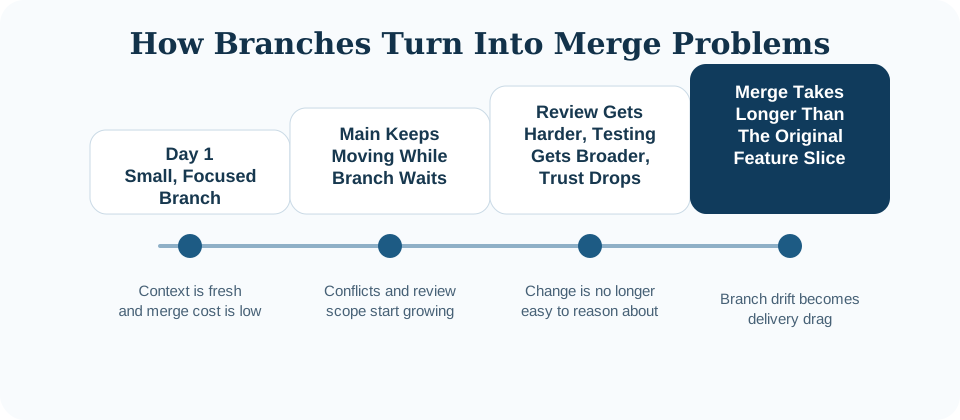
When a branch lives too long, several costs compound at once:
- merge conflicts get harder because the surrounding code has changed, not just the exact lines
- reviewers lose context because they are reading a week of decisions at once
- testing gets harder because the change surface is larger and less isolated
- rollback gets riskier because the branch often bundles multiple concerns together
This is one reason strong teams prefer short-lived branches. Not because short branches are morally superior, but because they keep coordination cost low.
If a feature is too large to merge in one pass, split it:
- merge preparatory refactors first
- hide incomplete behavior behind a feature flag
- land schema changes separately from behavior changes
- use incremental PRs that build on each other
That approach keeps history boring, which is exactly what you want.
# Better: ship the smallest reviewable slice first
git checkout -b feat/search-index-schema
# add index and migration only
git push origin feat/search-index-schema

# follow with behavior in a second PR
git checkout -b feat/search-index-usage
If your branch is already old, do not wait until the end to reconcile it. Rebase or merge from main intentionally while the change is still understandable. The longer you wait, the more expensive the update becomes.
Mistake 2: Opening Pull Requests That Are Too Large To Review Well
Large PRs are one of the easiest ways to fool yourself about delivery speed.
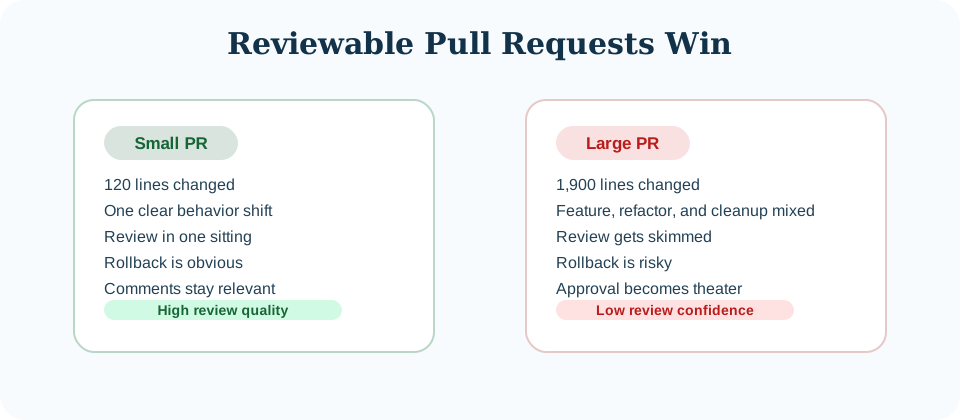
On paper, one giant PR feels faster than three smaller ones. In practice, huge diffs slow everything down:
- reviewers skim instead of reading carefully
- feedback arrives later because nobody has a clean hour to review it
- bugs hide in noise because behavioral changes sit next to renames, formatting, and refactors
- authors defend complexity that should have been split earlier
Once a PR gets big enough, review quality collapses into approval theater. Somebody scans, leaves one or two comments, and approves because they cannot afford to hold the queue forever.
That should sound familiar if you have read Testing in the Real World. Confidence does not come from having a process on paper. It comes from having a process people can actually execute well. Giant pull requests fail that test.
Better patterns:
- split refactors from feature behavior
- submit one PR for schema or interface changes and another for adoption
- stack small PRs if the work is logically sequential
- leave deliberate notes in the PR description about what is intentionally out of scope
A useful smell test is this: can a reviewer understand the whole change in one sitting without rushing? If the answer is no, the PR is too big.
Mistake 3: Mixing Unrelated Changes In The Same Commit
Many teams say they care about atomic commits. Fewer teams act like they do.
The common failure mode looks like this:
- one commit updates business logic
- also renames a utility
- also reformats unrelated files
- also removes dead code in another module
That commit is annoying to review today and expensive to reason about later.
Why it matters:
git blamebecomes less useful because unrelated edits obscure real historygit revertbecomes dangerous because reverting the bug also reverts unrelated cleanup- release debugging gets slower because the commit does too many things to isolate quickly
- teammates cannot selectively cherry-pick or backport the change cleanly
Here is the wrong version:
commit 4fa21b9
Message: updates

- switch auth token parsing logic
- rename api helper functions
- fix typo in README
- remove old CSS variables
Here is the better version:
commit 8c71f42
fix(auth): reject expired refresh tokens before session lookup

commit 5e413fd
refactor(api): rename request helpers for consistent response handling

commit 2d9959e
docs: fix README typo in local setup instructions
The second version is not just prettier. It is operationally better. It lets a teammate revert the auth fix independently, understand intent quickly, and review changes in the right mental buckets.
If you are about to commit and your diff contains multiple ideas, stage intentionally:
git add -p
git status
git commit -m "fix(auth): reject expired refresh tokens before session lookup"
git add -p is one of the simplest ways to improve commit hygiene without changing anything else about your workflow.
Mistake 4: Using The Wrong Undo Command
This is the mistake people make when the pressure is already high.
Something went wrong. Maybe you committed the wrong file. Maybe you pushed a bad change. Maybe you want to discard local edits. Maybe production is broken and you need the safest path back to a known good state.
This is where developers reach for whatever command they half-remembered last time.
That is dangerous because Git undo commands solve different problems.
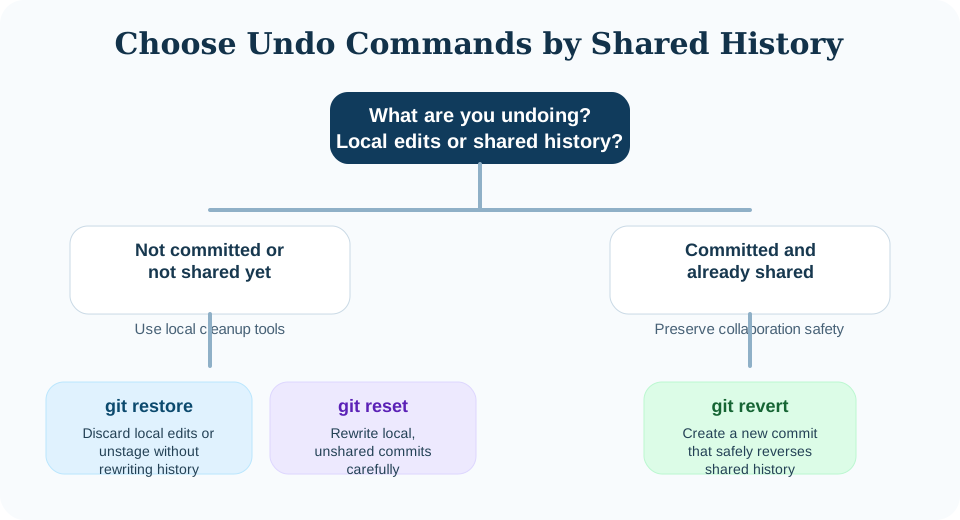
The right first question is not “what command removes this?” It is “is this change already shared?”
Use git restore for local working tree changes
If you changed a file and want to discard the unstaged edit, restore is usually the clearest tool.
# discard local unstaged changes in one file
git restore src/auth/session.ts

# unstage a file but keep local edits
git restore --staged src/auth/session.ts
This is a low-risk local cleanup command. It does not rewrite commit history.
Use git reset when you are rewriting local, unshared history
reset is powerful, which is exactly why it is easy to misuse.
# undo the last commit but keep the changes staged
git reset --soft HEAD~1

# undo the last commit and unstage the changes
git reset HEAD~1
That can be perfectly safe on your own local branch if nobody else depends on that history yet.
It becomes risky when you use it on commits that are already pushed to a shared branch, because now you are rewriting history other people may have pulled.
Use git revert when the history is already shared
If a bad commit is already on a shared branch, revert is usually the safest answer.
# create a new commit that reverses an older shared commit
git revert 8c71f42
revert preserves history. That makes it slower to read than pretending the old commit never existed, but much safer for collaborative recovery.
That is why revert is often the right production-minded choice.
About git checkout
Older Git advice often uses checkout for everything: switching branches, discarding files, restoring state. Modern Git split those behaviors into clearer commands like switch and restore. That is a good change. A command that does fewer unrelated things is easier to use safely under pressure.
The durable rule is simple:
- if the change is local and unshared,
restoreorresetmay be appropriate - if the change is shared, prefer
revert - if you are not sure whether someone else depends on the history, assume they do
Mistake 5: Force-Pushing Without Discipline
Force-push is not evil. Undisciplined force-push is.
There are valid reasons to rewrite history:
- cleaning up your own feature branch before review
- squashing noisy local commits into a coherent series
- updating a PR branch you alone control
The problem starts when teams blur the line between private cleanup and shared history.
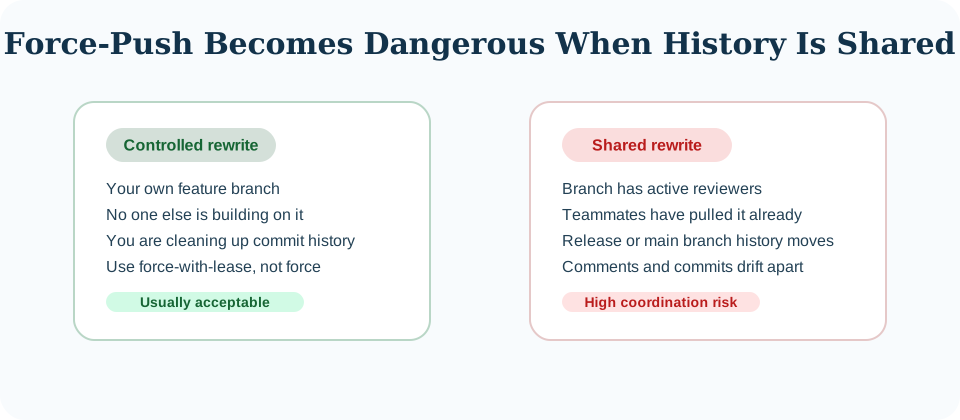
If you force-push a branch that others are using, several bad things can happen fast:
- a teammate loses commits or has to recover them manually
- review comments no longer line up with the code being discussed
- debugging gets harder because the branch history changed mid-investigation
- trust drops because nobody is sure whether what they reviewed still exists
At minimum, if you must rewrite your own remote branch, prefer this:
git push --force-with-lease
--force-with-lease is safer than --force because it refuses to overwrite remote history you do not have locally. It is not magic, but it prevents one class of accidental damage.
Reasonable rules:
- rewriting your own PR branch before others depend on it is usually fine
- rewriting
main, release branches, or widely shared branches should be rare and coordinated - if people are already reviewing or building on top of your branch, tell them before rewriting its history
History rewriting is a sharp tool. Treat it like one.
Mistake 6: Skipping Basic Hygiene Before Commit Or Push
Some Git mistakes are not dramatic. They are just sloppy, and they still cost the team time.
Examples:
- leaving
console.logor temporary debug code in the diff - committing unrelated formatting noise with a behavior change
- staging generated files accidentally
- pushing secrets, tokens, or copied environment data
- forgetting a migration file or test that the behavior depends on
These are preventable errors, and the cheapest moment to catch them is right before commit or push.
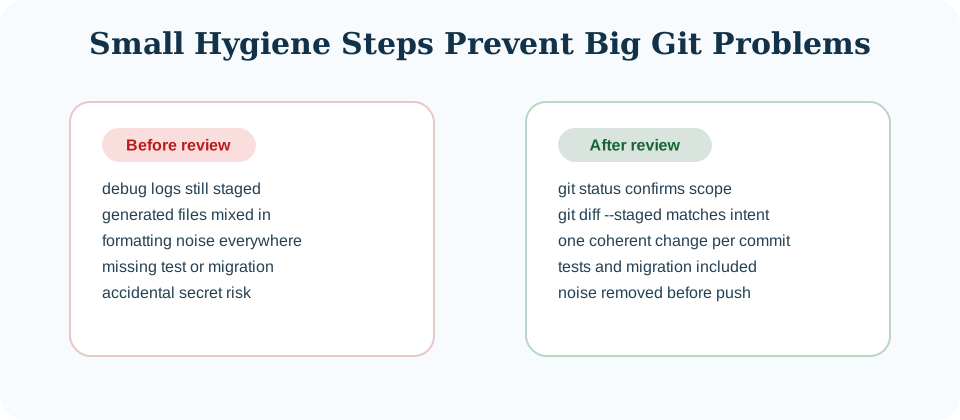
A simple pre-push routine catches more problems than people expect:
git status -sb
git diff --staged
git diff
That sequence answers three useful questions:
- what changed overall?
- what is actually staged?
- what is still unstaged and might have been forgotten?
This habit is boring, but boring is good. Boring habits prevent expensive mistakes.
Hooks and CI help too, but they are not a substitute for looking at your own diff. They catch classes of problems. They do not replace human judgment about whether the change is coherent.
Mistake 7: Treating Commit Messages And Stash Like Afterthoughts
Bad commit messages look harmless because the code is still there. The damage only appears later.
Messages like these are low-signal:
fix stuffupdateswipfinal changes
They fail exactly when history needs to help you most.
Good commit messages do not need to be literary. They need to answer one question clearly: what changed and why should a future reader care?
Compare these:
bad: fix login
good: fix(auth): prevent duplicate session creation during OAuth callback retry
The second message helps during code review, incident response, release triage, and future archaeology.
Stash has a similar problem. It is useful for short interruptions. It becomes messy when it turns into invisible storage.
This is fine:
git stash push -m "wip: checkout form validation spike"
git stash list
git stash pop
This is less fine:
- 11 unnamed stash entries
- no idea which branch they came from
- no confidence about whether they still apply cleanly
If work matters for more than a brief interruption, give it a branch. Branches are visible. Stashes are easy to forget.
A surprisingly useful recovery pattern is:
git stash branch wip/checkout-validation stash@{0}
That turns hidden work back into explicit work.
A Practical Git Checklist For Teams
Before opening or merging a change, review it with questions like these:
- Is this branch still small enough to merge soon?
- Can this PR be reviewed carefully in one sitting?
- Does each commit represent one coherent idea?
- If this needs rollback, will the history help or hurt?
- Has the author reviewed the exact staged diff?
- Is any history rewrite affecting other people?
- If this branch lived another three days, would it get materially riskier?
You do not need a ceremonial process around these questions. You just need the team to care about them consistently.
The Underlying Rule
Most Git advice gets framed around command mastery. That matters, but it is not the deepest skill.
The deeper skill is shaping change so it stays understandable.
Good Git habits make changes easier to review, easier to merge, easier to debug, easier to revert, and easier to trust. That is why they matter. Not because clean history is aesthetically pleasing, but because software delivery is already hard enough without confusing your own change history.
The point of Git is not to let you manipulate history in impressive ways. The point is to help teams change software safely.
Comments
Join the discussion on GitHub.